SV02 - Projet transversal : WordPress en architecture 3 tiers
Objectif
Refaire de A à Z l’infrastructure du projet transversal B1 : 3 VM sur Proxmox - un routeur (NAT + pare-feu + HAProxy + rebond SSH), un serveur web (Apache + PHP + WordPress) et un serveur de base de données (MariaDB). Ton compte rendu d’origine : b1-proj-transversal-groupe-6.
1. L’architecture
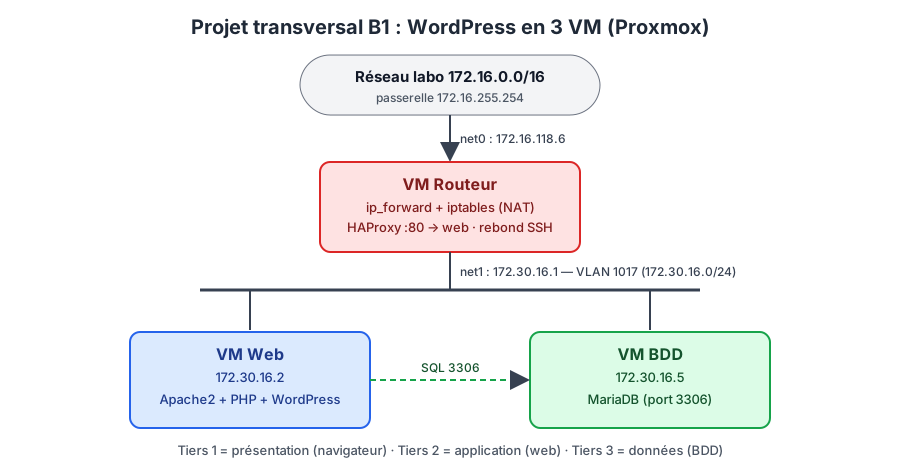
| VM | Nom | IP interne | IP labo | Services |
|---|---|---|---|---|
| Routeur | b1-serjugo-routeur | 172.30.16.1/24 | 172.16.118.6/16 | ip_forward, iptables (NAT), HAProxy, rebond SSH |
| Web | b1-serjugo-web | 172.30.16.2/24 | - | Apache2, PHP, WordPress |
| BDD | b1-serjugo-bdd | 172.30.16.5/24 | - | MariaDB |
Pourquoi 3 tiers ? Séparer présentation / application / données : on peut sécuriser (la BDD n’est jamais exposée), faire évoluer (ajouter un 2e serveur web derrière HAProxy) et réparer chaque partie indépendamment.
2. Flux à autoriser
flowchart LR
  U["👤 Visiteur (réseau labo)"] -->|"HTTP 80"| R["Routeur<br/>HAProxy"]
  R -->|"HTTP 80"| W["Web"]
  W -->|"MariaDB 3306"| B["BDD"]
  ADM["🛠 Admin"] -->|"SSH 22"| R
  R -.->|"SSH (rebond)"| W
  R -.->|"SSH (rebond)"| B
  W & B -->|"NAT (apt update)"| R
3. Étape par étape
3.1 VM routeur
- Proxmox / cloud-init :
net0=172.16.118.6/16, passerelle172.16.255.254;net1=172.30.16.1/24(VLAN 1017) → V06 - Proxmox VE. - Routage + NAT + pare-feu :
sudo ./routeur_nat.sh eth0 eth1 172.30.16.0/24(scriptscripts/securite/routeur_nat.sh) → S03 - Pare-feu Linux (iptables et nftables). - HAProxy en façade du serveur web → SV03 - HAProxy (reverse proxy et répartition de charge).
3.2 VM BDD
sudo apt update && sudo apt install -y mariadb-server
sudo mariadb-secure-installation
sudo sed -i 's/^bind-address.*/bind-address = 0.0.0.0/' /etc/mysql/mariadb.conf.d/50-server.cnf
sudo systemctl restart mariadb
sudo mariadb <<'SQL'
CREATE DATABASE IF NOT EXISTS wordpress CHARACTER SET utf8mb4 COLLATE utf8mb4_unicode_ci;
CREATE USER IF NOT EXISTS 'wpuser'@'172.30.16.2' IDENTIFIED BY 'MotDePasse#Fort1';
GRANT ALL PRIVILEGES ON wordpress.* TO 'wpuser'@'172.30.16.2';
FLUSH PRIVILEGES;
SQL
Détails : B07 - MariaDB et MySQL.
3.3 VM Web
sudo apt update
sudo apt install -y apache2 php libapache2-mod-php php-mysql php-curl php-gd php-mbstring php-xml php-zip php-intl mariadb-client
# Test de la connexion à la BDD AVANT d'installer WordPress
mariadb -h 172.30.16.5 -u wpuser -p wordpress -e "SELECT 'connexion OK';"

cd /tmp
wget https://wordpress.org/latest.tar.gz
tar -xzf latest.tar.gz
sudo cp -r wordpress/* /var/www/html/
sudo rm -f /var/www/html/index.html
sudo chown -R www-data:www-data /var/www/html/
sudo cp /var/www/html/wp-config-sample.php /var/www/html/wp-config.php
sudo sed -i "s/database_name_here/wordpress/"        /var/www/html/wp-config.php
sudo sed -i "s/username_here/wpuser/"                /var/www/html/wp-config.php
sudo sed -i "s/password_here/MotDePasse#Fort1/"      /var/www/html/wp-config.php
sudo sed -i "s/localhost/172.30.16.5/"               /var/www/html/wp-config.php
Ajouter les clés de sécurité : remplacer le bloc put your unique phrase here par le contenu de curl -s https://api.wordpress.org/secret-key/1.1/salt/.
Ou en une commande avec le script du TP Linux : ./deploiement_roles.sh 172.30.16.2 wordpress → L07 - Scripting Bash.
3.4 Accès d’administration
~/.ssh/config avec ProxyJump routeur → ssh vm-web, ssh vm-bdd ; tunnel pour tester le site sans HAProxy : ssh -L 8080:172.30.16.2:80 sercha@172.16.118.6 puis http://localhost:8080 → L08 - SSH, SCP et SFTP.
3.5 Routes inter-groupes
Pour que tous les groupes se pinguent, chaque routeur reçoit une route vers le réseau interne des autres :
sudo ip route add 172.30.12.0/24 via 172.16.118.1   # groupe 1
sudo ip route add 10.11.12.0/24  via 172.16.118.2   # groupe 2
# … une ligne par groupe
4. Recette
| Test | Commande / action | Attendu |
|---|---|---|
| Web → BDD | mariadb -h 172.30.16.5 -u wpuser -p depuis la VM web | Connexion OK |
| BDD non exposée | nc -zv 172.16.118.6 3306 depuis le labo | Refusé / filtré |
| Site via HAProxy | http://172.16.118.6 depuis le labo | Installation WordPress |
| NAT | apt update sur la VM web | OK |
| Rebond SSH | ssh vm-bdd | Shell sur la BDD |
| HAProxy | sudo systemctl status haproxy, journalctl -u haproxy | active, server web UP |
5. Pistes d’amélioration (à proposer à l’oral)
- HTTPS sur HAProxy (certificat), redirection 80 → 443.
- 2e serveur web +
balance roundrobin(haute disponibilité), 2e routeur + Keepalived. - Sauvegarde automatique de la base (
mariadb-dump+ cron) et des fichiers WordPress. - Supervision (Zabbix) → P04 - Supervision (SNMP, Zabbix).